🌐 Crawl a new URL
In the  menu, or in the Administration interface, by clicking
 🌐 Crawl a new URL you can queue one or
multiple URLs to be crawled when a worker is available.
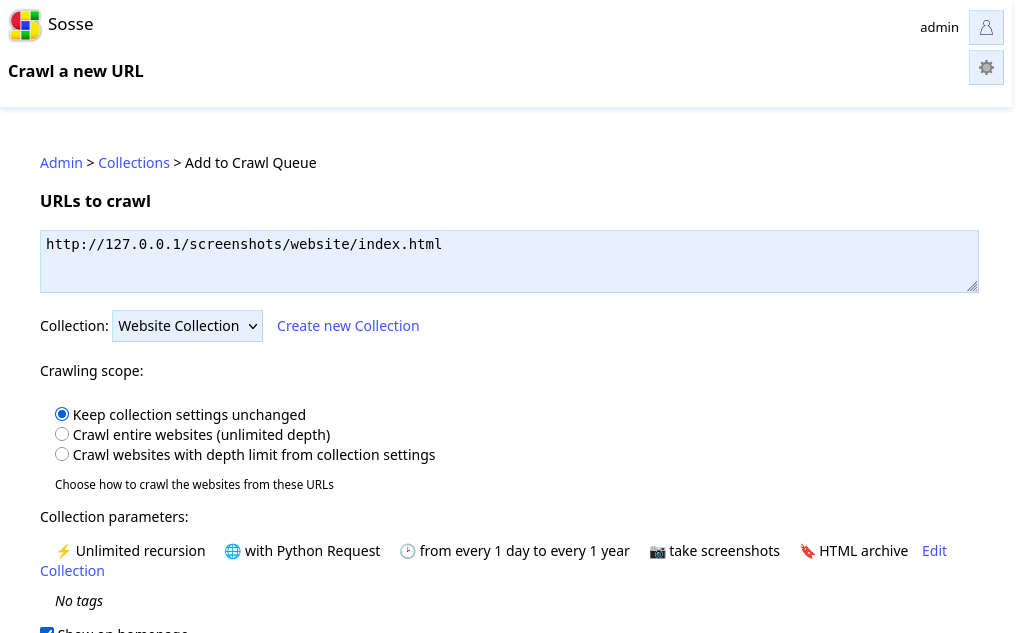
By default, only the URLs queued for crawling will be visited. The crawler will not recurse into discovered links unless explicitly configured.
When adding URLs to the queue, you can choose a crawling scope:
Keep collection settings unchanged: Use the collection’s existing regex patterns without modification
Crawl entire websites (unlimited depth): Automatically add the URL hostnames to the collection’s unlimited regex, allowing full crawling of those websites
Crawl with depth limit from collection settings: Add the URL hostnames to the collection’s limited regex, applying the collection’s recursion depth limit
The crawling scope setting automatically extracts hostnames from the submitted URLs and adds appropriate regex patterns to the selected collection. This provides a convenient way to expand crawling scope without manually editing collection regex patterns.
To control how pages are indexed and whether recursion occurs, update the relevant settings in ⚡ Collections.
After submitting a URL, the next page shows the ✔ Crawl queue.