Monitor Websites for Specific Keywords
SOSSE can be used to receive updates when a new page containing a specific keyword is published on a website. This functionality can be applied to a variety of use cases, such as monitoring merchant websites for promotional offers, or watching for event announcements.
For this use case, we’ll monitor a website for common functional errors, like missing pages, server crashes, forbidden access, and database issues, and generate an Atom feed of faulty pages.
Creating the Crawl Policies
Crawl policies are essential for controlling how SOSSE accesses and logs content from websites. For more details, see the Crawl Policies documentation.
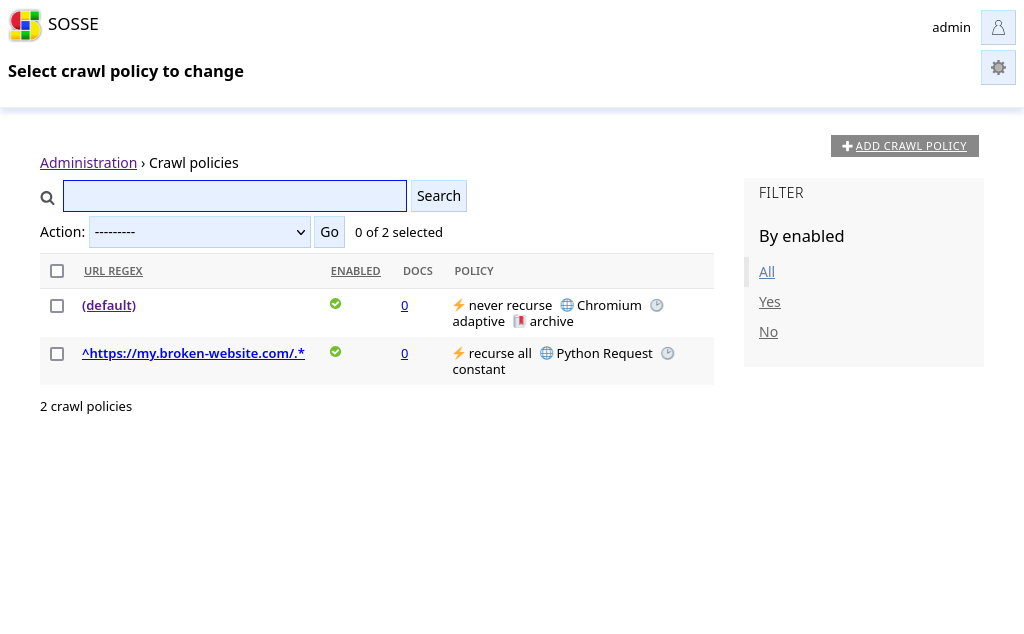
We add a policy for the website that we want to monitor, with the parameters:
In the
⚡ Crawltab, use a regular expression^https://my.broken-website.com/.*to target the website.In the
🔖 Archivetab, disableArchive content(as we don’t need to archive the original feed).In the
🕑 Recurrencetab, setCrawl frequencytoConstant timeand clear theRecrawl dt maxfield.
Start Crawling
To start crawling, go to the Crawl a new URL page and enter the URL of the homepage:
https://my.broken-website.com/.
Check the parameters, then click Confirm. Once confirmed, SOSSE will begin crawling and logging any pages that match
the regular expression from the Crawl Policy every day.
Generate Atom Feed
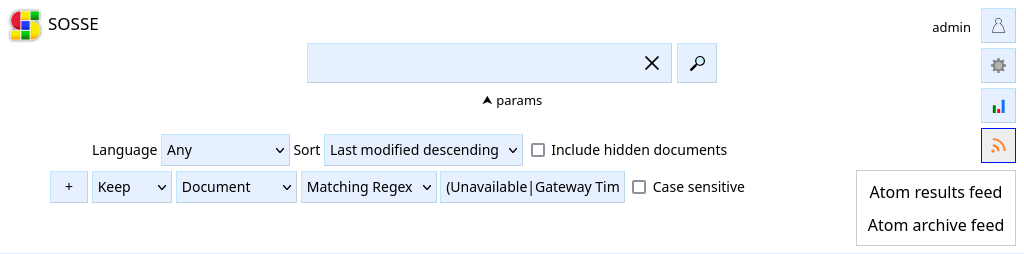
To get notified of errors, create a search with the following parameters:
Sort:
Last modified descending. This ordering causes the feed to generate new entries for previously known pages whenever they are modified.Search options:
Action:
KeepField:
DocumentOperator:
Matching RegexValue:
(Database Connection Failed|Internal Server Error|Not Found|Forbidden|Bad Gateway|Service Unavailable|Gateway Timeout|Request Timeout)
The pages in error can then be followed by subscribing to the Atom results feed (see Atom feeds).
Additional Options
You may need to update the Crawl Policy to use a browser if the site relies on JavaScript or requires authentication to access private areas. Additionally, it could be useful to configure the atom feed to function while anonymous searches are disabled. Once configured, you can integrate it with services like Zapier or IFTTT to trigger notifications whenever a new error is detected.